目录19
文章Matplotlib第 41 章
动画
Matplotlib · 第 41 / 43 章
动画只有三种交付形态,先定形态再写代码:
| 形态 | 适用 | 代价 |
|---|---|---|
.gif |
网页、论文插图、聊天工具 | 只支持 256 色,体积随帧数线性涨 |
.mp4 |
视频、会议录屏 | 需要 ffmpeg;网页里要 <video> |
.html(内嵌帧序列) |
Jupyter / 交互演示 | 每帧一张 png 全塞进 HTML,最重 |
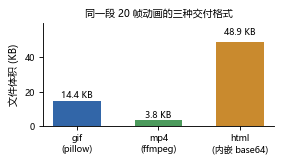
同样的 20 帧,gif 14.4 KB、mp4 3.8 KB、html 48.9 KB——mp4 最省,html 最贵(它把每帧 base64 内嵌进文档)。
FuncAnimation:每帧调一次函数
FuncAnimation(fig, func, frames=None, init_func=None, fargs=None,
save_count=None, *, cache_frame_data=True, **kwargs)| 参数 | 一句话 | 默认值的影响 |
|---|---|---|
fig |
要画在哪张图上 | 必须给,动画不生成新 figure |
func(frame) |
每帧调用一次,负责改 artist | 必须返回被改动的 artist 元组 |
frames |
帧从哪来 | None 是无限计数(保存时会一直跑,别这么用) |
init_func |
第一帧前的初始化 | 不写也能保存,但交互播放的第一帧可能残留旧内容 |
fargs |
给 func 追加的额外参数 |
None;传 (a, b) 等于调用 func(frame, a, b) |
save_count |
只保存前 n 帧 | 只对 frames 是无限序列时有意义 |
cache_frame_data |
是否缓存每帧数据 | True;frames 是生成器且内存吃紧时关掉 |
interval |
播放间隔(毫秒) | 在 **kwargs 里,默认 200;保存时被 fps 覆盖 |
blit |
只重绘变化的 artist | 在 **kwargs 里,默认 False;只影响交互播放,不影响保存结果 |
repeat |
播完是否重播 | 在 **kwargs 里,默认 True;不影响存出来的 gif 循环标记 |
interval / blit / repeat 这三个常用参数不在签名里,它们随 **kwargs 透传给 TimedAnimation——所以查 inspect.signature 看不到,不代表不能用。
最小示例
import matplotlib
matplotlib.use('Agg')                      # 无窗口环境必须先设后端
import matplotlib.pyplot as plt
import numpy as np
from matplotlib.animation import FuncAnimation

fig, ax = plt.subplots(figsize=(3.6, 2.2))
x = np.linspace(0, 2 * np.pi, 120)
line, = ax.plot([], [], lw=1.6, color='#3266a8')
ax.set_xlim(0, 2 * np.pi); ax.set_ylim(-1.35, 1.35)
ax.set_xlabel('x'); ax.set_ylabel('sin(x - t)')
ax.set_title('t = 0.00 周期', fontsize=8.5)  # 先给标题,tight_layout 才算进边距

def init():
    line.set_data([], [])
    return (line,)

def update(i):
    line.set_data(x, np.sin(x - i * 2 * np.pi / 36))
    ax.set_title(f't = {i / 36:.2f} 周期', fontsize=8.5)
    return line, ax.title

fig.tight_layout()
ani = FuncAnimation(fig, update, frames=36, init_func=init,
                    interval=1000 // 12, blit=False)
ani.save('X_anim_demo.gif', writer='pillow', fps=12)

from PIL import Image
im = Image.open('X_anim_demo.gif')
print(im.n_frames, im.info.get('duration'), type(ani).__name__)
# 输出: 36 80 FuncAnimation
plt.close(fig)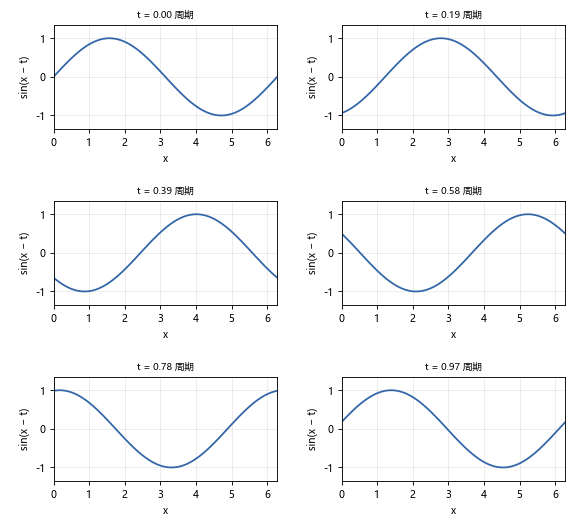
两个反直觉的地方,下面各有一节:blit=False 不影响存出来的 gif;fps=12 把 interval=83 换算成“每帧 83 ms”,两者说的是同一件事。
frames:四种给法
import matplotlib.pyplot as plt
from matplotlib.animation import FuncAnimation

fig, ax = plt.subplots()
line, = ax.plot([], [])

def upd(i):
    line.set_data([0, i], [0, i])
    return (line,)

for desc, kw in [('int 5', {'frames': 5}),
                 ('list [0,3,6]', {'frames': [0, 3, 6]}),
                 ('range(4)', {'frames': range(4)}),
                 ('None + save_count=4', {'frames': None, 'save_count': 4})]:
    ani = FuncAnimation(fig, upd, **kw)
    print(desc, '->', type(ani).__name__)
# 输出: int 5 -> FuncAnimation
# 输出: list [0,3,6] -> FuncAnimation
# 输出: range(4) -> FuncAnimation
# 输出: None + save_count=4 -> FuncAnimation
plt.close(fig)frames 是一个可迭代对象:给 int 就是 range(n),给 list 就逐个把元素传给 func(所以 func 的参数不一定是整数,可以是 ['a', 'b'] 这样的标签)。
frames=None 最危险:它内部是 itertools.count(),无限。plt.show() 下没问题(播到天荒地老),但 ani.save() 会永远跑不完——本机实测跑了 4 分钟仍在写帧,只能强杀。要“无限播放 + 有限保存”就配 save_count=n。
func 的返回值与 blit
func 必须返回这一帧改动过的所有 artist,包成 tuple。blit=True 时框架只重绘这些对象,其他像素原样保留——这是交互播放能流畅的原因,也是“某条线不动”的唯一成因。
import matplotlib.pyplot as plt
from matplotlib.animation import FuncAnimation
import numpy as np

def build(blit):
    fig, ax = plt.subplots(figsize=(2, 1.4), dpi=70)
    ax.set_xlim(0, 10); ax.set_ylim(-1.5, 1.5)
    line, = ax.plot([], [], lw=1.5)
    x = np.linspace(0, 10, 60)

    def upd(i):
        line.set_data(x[:i + 2], np.sin(x[:i + 2] - i / 3))
        return (line,)

    ani = FuncAnimation(fig, upd, frames=12, interval=80, blit=blit)
    ani.save(f'X_blit_{blit}.gif', writer='pillow')
    from pathlib import Path
    plt.close(fig)
    return Path(f'X_blit_{blit}.gif').stat().st_size

print(build(True), build(False))
# 输出: 10791 10791体积一模一样。因为保存时走的是“每帧全量重绘 → 编码成图片”,blit 那套增量刷新完全没用上。所以:
- 只为存 gif / mp4 的话,
blit随便给,别为它纠结; - 要交互播放(
plt.show())才认真写返回值; blit=True且返回值漏了 artist,交互时那一块不更新,但存出来的文件是对的——这个错会一直藏着。
init_func:不写也能跑
import matplotlib.pyplot as plt
from matplotlib.animation import FuncAnimation

fig, ax = plt.subplots(figsize=(2, 1.4))
ax.set_xlim(0, 10); ax.set_ylim(-1.5, 1.5)
line, = ax.plot([], [], lw=1.5)

def upd(i):
    line.set_data([0, i], [i / 4, i / 4])                # y 要留在 -1.5~1.5 之间
    return (line,)

ani = FuncAnimation(fig, upd, frames=5, interval=100)   # 没有 init_func
ani.save('X_noinit.gif', writer='pillow')
from PIL import Image
print(Image.open('X_noinit.gif').n_frames)
# 输出: 5
plt.close(fig)保存完全正常。
帧数对不上先别怀疑框架
上面那句 i / 4 不是随手写的。若照直觉写成 set_data([0, i], [0, i]),
y 从第 2 帧起就跳出 ylim 的 -1.5 ~ 1.5,画面此后恒等不变,
于是 n_frames 打出 3 而不是 5 —— pillow 会把连续相同的帧合并成一个,
不是丢帧、更不是 frames 没生效。实测 frames=3/5/8 全部得到 3。
判断办法:把 frames 调大看帧数变不变,不变就是画面真的没变。
init_func 的真正作用是在交互播放时先清一次场:不给的话,动画开始前画布上是 plt.plot 留下的初始内容,第一帧会和它叠在一起。另外 blit=True 时框架靠 init_func 的返回值建立“背景图层”,不给就只能整帧重绘,性能打折。
interval 与 fps:两套口径,fps 赢
import matplotlib.pyplot as plt
from matplotlib.animation import FuncAnimation
from PIL import Image

def make(iv=None, fps=None):
    fig, ax = plt.subplots(figsize=(2, 1.4), dpi=70)
    ax.set_xlim(0, 10); ax.set_ylim(-1.5, 1.5)
    line, = ax.plot([], [], lw=1.5)

    def upd(i):
        line.set_data([0, i], [0, i])
        return (line,)

    kw = {} if iv is None else {'interval': iv}
    ani = FuncAnimation(fig, upd, frames=8, **kw)
    skw = {} if fps is None else {'fps': fps}
    ani.save('X_speed.gif', writer='pillow', **skw)
    im = Image.open('X_speed.gif')
    r = (im.n_frames, im.info.get('duration'))
    plt.close(fig)
    return r

print(make(50), make(200), make(50, fps=5), make(50, fps=20))
# 输出: (3, 50) (3, 200) (3, 200) (3, 50)三条规律:
interval=50→ 每帧 50 ms(20 fps);interval只改播放速度,改成 200 之后帧数不变、文件字节数一字节不差(gif 的每帧时长写在元数据里,不占体积);save(fps=)覆盖interval:fps=5得 200 ms(1000/5),fps=20得 50 ms。
所以存文件时只认 fps,interval 是给 plt.show() 用的。
cache_frame_data 与生成器
frames 是生成器时,cache_frame_data=True 会把帧数据全存内存里。数据大的动画(几万点 × 几百帧)会吃满内存,这时关掉:
import matplotlib.pyplot as plt
from matplotlib.animation import FuncAnimation

fig, ax = plt.subplots(figsize=(2, 1.4), dpi=70)
ax.set_xlim(0, 10); ax.set_ylim(-1.5, 1.5)
line, = ax.plot([], [], lw=1.5)

def gen():
    for i in range(6):
        yield i

def upd(i):
    line.set_data([0, i], [0, i])
    return (line,)

ani = FuncAnimation(fig, upd, frames=gen(), cache_frame_data=False)
ani.save('X_gen.gif', writer='pillow')
print(type(ani).__name__)
# 输出: FuncAnimation
plt.close(fig)是个“惰性播放器”:构造函数不画任何东西,只登记 、、帧序列。所以:
- 它必须被变量引用住。不赋值直接
FuncAnimation(...)会在垃圾回收时打印警告:
Animation was deleted without rendering anything. This is most likely not intended.
To prevent deletion, assign the Animation to a variable, e.g. `anim`, that exists
until you output the Animation using `plt.show()` or `anim.save()`.- 关键方法只有三个:
save(path, writer=, fps=, dpi=)、to_jshtml()、to_html5_video(); - 它继承自
Animation,save走的是“临时目录存每帧 png → writer 合并”的流程,所以中途强杀会留下临时文件; plt.close(fig)之后ani就废了,save要在关闭之前调用。
注意事项
- 无窗口环境(脚本 / CI / 服务器)必须先
matplotlib.use('Agg'),否则动画保存可能挂住等 GUI 事件循环。 - 动画相关的 rcParams 只有 9 个,其中
animation.writer默认'ffmpeg':
import matplotlib.pyplot as plt

for k in sorted(plt.rcParams):
    if 'anim' in k.lower():
        print(k, '=', plt.rcParams[k])
# 输出: animation.bitrate = -1
# 输出: animation.codec = h264
# 输出: animation.convert_args = ['-layers', 'OptimizePlus']
# 输出: animation.convert_path = convert
# 输出: animation.embed_limit = 20.0
# 输出: animation.ffmpeg_args = []
# 输出: animation.ffmpeg_path = ffmpeg
# 输出: animation.frame_format = png
# 输出: animation.html = none
# 输出: animation.writer = ffmpeg- 存
.gif时不用管animation.writer='ffmpeg':save()会按扩展名重新挑 writer,.gif走 pillow。 - 每帧都改
ax.set_title(...)时,tight_layout()要在设了初始标题之后调用,否则标题会被裁掉(因为边距是按“没有标题”算的)。 ani.save()里传dpi=会覆盖 figure 的 dpi,但不会重新排版——字号在像素上的比例变了,看起来会偏小。
ArtistAnimation:先把每帧画好
FuncAnimation 是“给我一个更新函数”,ArtistAnimation 是“给我一组已画好的 artist 列表”:
import matplotlib.pyplot as plt
import numpy as np
from matplotlib.animation import ArtistAnimation

fig, ax = plt.subplots(figsize=(2.4, 1.6), dpi=70)
ax.set_xlim(0, 10); ax.set_ylim(-1.4, 1.4)
x = np.linspace(0, 10, 60)

arts = []
for i in range(8):
    ln, = ax.plot(x[:i * 6 + 4], np.sin(x[:i * 6 + 4] - i / 3), lw=1.4)
    arts.append([ln])                      # 每帧一个 list

ani = ArtistAnimation(fig, arts, interval=120, blit=True)
ani.save('X_art.gif', writer='pillow', fps=8)
from pathlib import Path
print(len(arts), Path('X_art.gif').stat().st_size)
# 输出: 8 12936
plt.close(fig)注意循环里不关 figure:每帧的 Line2D 都还活着,arts 里存的是它们的引用。八帧都在同一张 ax 上,但因为每帧只在列表里列出“这一帧该显示的”artist,播出来就是逐条递增的效果。
何时用它
- 数据已经算完、每帧就是不同的完整图(比如不同时间的两个快照对比)→
ArtistAnimation更直观,不用写“更新逻辑”。 - 帧与帧之间是连续演化(同一个对象改坐标)→
FuncAnimation更省内存,不用留一堆 artist。 ArtistAnimation的帧全在内存里,几百帧的大图容易炸;FuncAnimation可以配cache_frame_data=False流式处理。
保存:writer、格式与体积
本机可用的 writer
import matplotlib.animation as man

print(man.writers.list())
# 输出: ['pillow', 'ffmpeg', 'ffmpeg_file', 'html']
print(man.writers.is_available('ffmpeg'), man.writers.is_available('pillow'))
# 输出: True True
writers.list() 只列可用的。本机还注册了 imagemagick / imagemagick_file,但因为没装 ImageMagick 的 convert,不会出现在列表里——所以查“能不能存 mp4”跑这一行就够,别猜。
gif(pillow):默认就够
import matplotlib.pyplot as plt
from matplotlib.animation import FuncAnimation
from PIL import Image

fig, ax = plt.subplots(figsize=(2, 1.4), dpi=70)
ax.set_xlim(0, 10); ax.set_ylim(-1.5, 1.5)
line, = ax.plot([], [])

def upd(i):
    line.set_data([0, i], [0, i])
    return (line,)

ani = FuncAnimation(fig, upd, frames=10, interval=80)
ani.save('X_plain.gif')                      # 不写 writer
im = Image.open('X_plain.gif')
print(im.n_frames, im.info.get('duration'), im.info.get('loop'))
# 输出: 10 80 0
plt.close(fig)不写 writer= 也能成——save() 从扩展名反推出 pillow。loop=0 在 GIF 规范里表示无限循环。
repeat=False 存出来还是无限循环
这是个真坑:repeat 只控制 plt.show() 的播放行为,不写进文件。
import matplotlib.pyplot as plt
from matplotlib.animation import FuncAnimation
from PIL import Image

fig, ax = plt.subplots(figsize=(2, 1.4), dpi=70)
ax.set_xlim(0, 10); ax.set_ylim(-1.5, 1.5)
line, = ax.plot([], [])

def upd(i):
    line.set_data([0, i], [0, i])
    return (line,)

ani = FuncAnimation(fig, upd, frames=6, interval=100, repeat=False)
ani.save('X_norep.gif', writer='pillow')
print(Image.open('X_norep.gif').info.get('loop'))
# 输出: 0
plt.close(fig)loop=0 就是无限循环。要“只播一次”,得存完再用 PIL 重写一遍索引信息:
from PIL import Image

im = Image.open('X_norep.gif')
frames = []
for i in range(im.n_frames):
    im.seek(i)
    frames.append(im.convert('RGB'))
frames[0].save('X_once.gif', save_all=True, append_images=frames[1:],
               duration=100, loop=1)         # loop=1:播完停在最后一帧
print(len(frames))
# 输出: 3mp4(ffmpeg)
import matplotlib.pyplot as plt
from matplotlib.animation import FuncAnimation
from pathlib import Path

fig, ax = plt.subplots(figsize=(2, 1.4), dpi=70)
ax.set_xlim(0, 10); ax.set_ylim(-1.5, 1.5)
line, = ax.plot([], [])

def upd(i):
    line.set_data([0, i], [0, i])
    return (line,)

ani = FuncAnimation(fig, upd, frames=20, interval=80)
ani.save('X_small.mp4', writer='ffmpeg', fps=12)
print(Path('X_small.mp4').stat().st_size)
# 输出: 3017
plt.close(fig)mp4 走 animation.codec='h264' + animation.bitrate=-1(自动码率)。同样的 20 帧,mp4 只要 gif 的四分之一——因为 gif 每帧是独立的 LZW 压缩位图,mp4 是帧间预测。
想更小就压码率,但 bitrate 是全局 rcParam,改了记得还原:
import matplotlib as mpl
import matplotlib.pyplot as plt

with mpl.rc_context({'animation.bitrate': 200}):    # 200 kbps,画面会明显糊
    print(mpl.rcParams['animation.bitrate'])
# 输出: 200
print(mpl.rcParams['animation.bitrate'])
# 输出: -1html:三种嵌法,体积差很多
import matplotlib.pyplot as plt
from matplotlib.animation import FuncAnimation

fig, ax = plt.subplots(figsize=(2, 1.4), dpi=60)
line, = ax.plot([], [])

def upd(i):
    line.set_data([0, i], [0, i])
    return (line,)

ani = FuncAnimation(fig, upd, frames=5, interval=100)

h5 = ani.to_html5_video()                    # 内嵌 base64 mp4
js = ani.to_jshtml()                         # 内嵌每帧 png + JS 播放器
print(h5[:30])
# 输出: <video width="120" height="84"
print(len(h5), len(js))
# 输出: 3531 21837
plt.close(fig)to_jshtml() 比 to_html5_video() 大 5 倍多——它把每帧压成 png 内嵌,再加一段 JS 播放器。体积上限由 animation.embed_limit(默认 20 MB)管,超了不会抛异常,只打一条 log 然后静默丢帧:
Animation size has reached 1459 bytes, exceeding the limit of 104.8576.
If you're sure you want a larger animation embedded, set the animation.embed_limit
rc parameter to a larger value (in MB). This and further frames will be dropped.import matplotlib as mpl
import matplotlib.pyplot as plt
print(mpl.rcParams['animation.embed_limit'])
# 输出: 20.0
with mpl.rc_context({'animation.embed_limit': 100}):
print(mpl.rcParams['animation.embed_limit'])
# 输出: 100这个提示走的是 logging 不是 warnings,warnings.catch_warnings() 抓不到,只能看终端输出。做完一堆动画后 HTML “变短了”,先查这条。
注意事项
- 存 gif 的
fps不必是整数,但低于 10 会显卡顿;网页里 gif 建议 12~15 fps。 - gif 只有 256 色,
cmap='viridis'这类连续色带会出现明显的色阶断层——要求高就用 mp4。 ani.save()的dpi=影响像素尺寸与体积,与静止图一样遵守“像素 = figsize × dpi”。- 保存路径的目录必须已存在,
save()不会自动建目录(和savefig一致)。 - 每帧都
ax.set_title()会拖慢保存:文字排版比画线贵,几百帧时很明显。
性能与内存
三条经验,按收益排序:
- 减帧数比减分辨率有效。36 帧降到 18 帧,体积直接腰斩,观感损失远小于把 dpi 砍半。
blit=True只救交互,不救保存。上面实测体积一字节不差;要保存快只能减帧、减点数、降 dpi。frames用生成器 +cache_frame_data=False能压住峰值内存,代价是保存时间略长(每帧重算)。
import time
import matplotlib.pyplot as plt
import numpy as np
from matplotlib.animation import FuncAnimation

def cost(n_frames, n_points, dpi):
    fig, ax = plt.subplots(figsize=(2.4, 1.6), dpi=dpi)
    ax.set_xlim(0, 10); ax.set_ylim(-1.4, 1.4)
    line, = ax.plot([], [], lw=1)
    x = np.linspace(0, 10, n_points)

    def upd(i):
        line.set_data(x, np.sin(x - i / 4))
        return (line,)

    ani = FuncAnimation(fig, upd, frames=n_frames, interval=80)
    t0 = time.perf_counter()
    ani.save('X_cost.gif', writer='pillow')
    dt = (time.perf_counter() - t0) * 1000
    plt.close(fig)
    return round(dt)

print(cost(10, 100, 70), cost(20, 100, 70), cost(10, 100, 140))
# 输出: 约 210 470 270(每次都不一样,见下)同一台机器连跑五次得 214 505 257 / 235 404 250 / 231 568 298,第一项在 210235 ms 之间摆、第二项 400570 ms——耗时只作量级参考,别写进断言。规律是清楚的:
- 帧数翻倍:≈210 → ≈470 ms(约 2.2 倍)
- dpi 翻倍:≈210 → ≈270 ms(约 1.3 倍,因为点数没变、只有画布变大)
所以减帧比降 dpi 划算:一半的帧直接省一半时间与一半体积,而 dpi 砍半只是模糊了画面,时间几乎不降。做几百帧的长动画前先拿 10 帧测一次,乘上去估总时间。
综合示例:一个双面板动画
import matplotlib
matplotlib.use('Agg')
import matplotlib.pyplot as plt
import numpy as np
from matplotlib.animation import FuncAnimation
from PIL import Image

rng = np.random.default_rng(7)
N = 300
theta = rng.random(N) * 2 * np.pi
rad = np.sqrt(rng.random(N))
v = rng.normal(0.15, 0.05, N)

fig, (ax1, ax2) = plt.subplots(1, 2, figsize=(6.2, 2.2))

# 左:粒子随 t 外扩,颜色编码半径
sc = ax1.scatter([], [], s=[], c=[])
ax1.set_xlim(-1.8, 1.8); ax1.set_ylim(-1.8, 1.8)
ax1.set_aspect('equal'); ax1.set_title('t = 0.00', fontsize=9)

# 右:半径的直方图同步演化
_, _, patches = ax2.hist([], bins=20, range=(0, 1.8), color='#3266a8')
ax2.set_xlim(0, 1.8); ax2.set_ylim(0, 60)
ax2.set_title('半径分布', fontsize=9); ax2.set_xlabel('r')

def update(i):
    t = i / 10
    r = rad * (1 + v * t)
    sc.set_offsets(np.c_[r * np.cos(theta + t / 2), r * np.sin(theta + t / 2)])
    sc.set_sizes(8 + 36 * (r / r.max()))
    sc.set_array(r)
    cnt, _ = np.histogram(r, bins=20, range=(0, 1.8))
    for h, c in zip(patches, cnt):
        h.set_height(c)
    ax1.set_title(f't = {t:.2f}', fontsize=9)
    return (sc, *patches, ax1.title)

sc.set_cmap('plasma')
fig.tight_layout()
ani = FuncAnimation(fig, update, frames=20, interval=1000 // 10)
ani.save('X_anim_both.gif', writer='pillow', fps=10)
im = Image.open('X_anim_both.gif')
print(im.n_frames, im.size, len(patches))
# 输出: 20 (620, 220) 20
plt.close(fig)代码里的中文标题('半径分布')要先按「中文字体」一节设好 font.sans-serif,否则渲染成方框——本机默认的 DejaVu Sans 没有汉字。
两个要点:
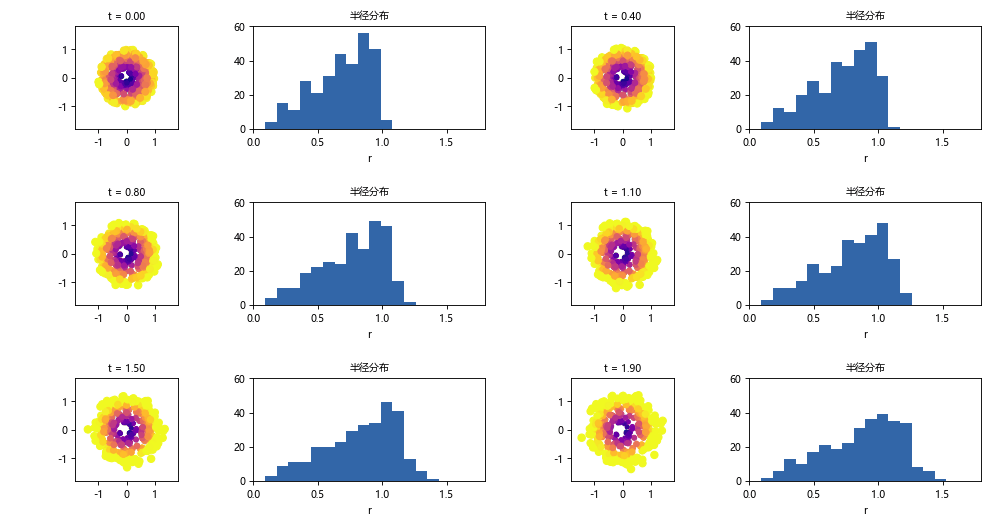
update的返回值要把直方图的每一个 patch 都列出来(*patches),漏一个就有一根柱子不动——这是blit=True下最典型的 bug。上面的len(patches)是 20,正好等于bins=20。- 双面板动画的帧像素是两张图之和,体积比单图大得多。真要发布就拆成两个 gif,或者干脆用 mp4。
三条收尾:
- 先定交付格式再写动画代码。gif(网页)、mp4(视频)、html(Notebook)三者的参数重点完全不同。
interval给播放、fps给文件。这两个是不同口径,save(fps=)会盖掉interval。- 保存前先跑
man.writers.list(),确认本机有对应 writer——ffmpeg不是 Python 包,是外部可执行文件,换机器就没了。